Blog

It’s Time to Treat Content as Part of the User Experience

Posted by wrttnwrd

Forget content marketing, SEO content, and whatever else as you know them. We need to fundamentally change our approach to content. It's not an add-on or a separate thing. It's an inseparable part of the user experience. Let's act that way.

Content: the silent epidemic

Your site's infested.

Most organizations treat content like some kind of horrific disease. They try to shove it as far away as possible from the "real" web site, like a bad case of body lice.

Where do they put it? The blog, of course:

Don't worry, this isn't another put-the-blog-on-the-site-dammit rant. Hopefully, you already understand that blog.site.com isn't as good as site.com/blog.

They also incorrectly define "content." Content isn't "stuff we write to rank higher" or "infographics" or "longform articles."

Content is anything that communicates a message to the audience. Anything.

Product descriptions? Content.

The company story? Content.

Images? Content.

That video of your company picnic that someone posted to your site three years ago and shows everyone dressed as Muppets? Content.

If it says something, shows something, or otherwise communicates, it's content.

Change your approach

We all need to change our entire approach to content. Treat it as part of the user experience, instead of a nasty skin disease:

  1. Integrate content that can enhance the user experience
  2. Optimize what you already have

Integrate content that can enhance the user experience

Interlink and integrate related information. That includes connecting promotional to informational and showing related visuals and text on promotional pages.

"Promotional" means product descriptions or anything else that "sells" an idea or makes a call to action to the visitor.

Companies are terrified of this. They believe it'll send customers away. But it doesn't happen.

I have never seen revenue drop because of interlinking or other integration. I have seen it generate long-term customer relationships, increase referrals and increase near-term conversions.

Link to the blog

If nothing else, link to relevant blog posts. People intent on making a purchase aren't going to click away never to return. Check out how Surly Bikes does it:

moz_content_4.jpg

(By the way, that bike's a steal at $2,700, if anyone's trying to figure out what to get me for Hanukkah this year.)

Linking to a relevant post allows really interested visitors to drill down an additional layer of detail. They can get impressions, learn why one product might be better for them than another, and maybe even (gasp) realize that the folks behind the product are just like them.

Embed related social content

Urban Outfitters does so much right. They have an amazing Instagram account:

But, for some reason, they don't link to it from product pages.

It's OK. I'm not cool enough for their stuff anyway. But why hide all those attractive people using their products? That'll encourage all sorts of purchasers.

Also, link to related social content right from your product pages. Ideally, you want to embed examples right in the page. At the very least, link prominently to the relevant account (but seriously, embed the examples).

Here's another example. I'm definitely a Democrat, but I have to offer a tip to the other side of the aisle here: If you have someone with decent YouTube videos, include 'em. Representative DeSantis has an entire YouTube channel. Why not show a few videos here?

moz_content_9.jpg

If you want to see someone do it right, have a look at top10.com. They're pulling Instagram images straight into their hotel information.

You can do this with any social platform that lets you: Facebook, Twitter, Instagram, Pinterest, Vine, etc. So what's stopping you?

Optimize what you already have

Your site is already stuffed with content.

You might deny it. But it's true.

So why not optimize what you've got?

Write decent descriptions

Whatever you're selling/promoting, write a decent description. That includes category pages. I'm not sure what to say about the following top-of-category page "description," so I'll go with hysterical, bitter laughter:

moz_content_12.png

By the way, for those who think this kind of content is a great SEO tactic, this site's on page 2 for "jeans."

I'm not thrilled with this one, as it's buried at the bottom of the category page and a little keyword stuffed, but compared to the previous, it's a shining light in the darkness:

moz_content_13.png

That site ranks #3 for "jeans."

Even if you care only about rankings, better descriptions are a better strategy.

At this time, the #1 site for "jeans" has a description buried at the bottom of their category page that's so awful I cried. I'll dig into that another time, but I doubt that travesty is helping them much, and more importantly, it sure doesn't make me want to buy anything.

Don't be ashamed

Your content is not a zit. Show it proudly. I like the way Juicy Couture does it. I can actually read the product description:

moz_content_10.jpg

This, on the other hand, makes me think I need bifocals.

moz_content_11.png

That's actual size, by the way.

Follow the same rules of typography you would anywhere else. Make sure your type is high-contrast and readable. Put it somewhere that I'll actually see it. At the very least, don't hide it, for heaven's sake.

Guide me when I'm lost

Please don't redirect me to a category page without any explanation. I'm not bashing a pinata.

Blindfolding me, spinning me around 8 times and then sending me on my way is not entertaining. It's annoying as hell.

If I search for a product you no longer sell, and click the description:

moz_content_5.png

  1. Show me the product page with a "Sorry, this product is no longer available. But you might like..." and send me along
  2. Or show me a note explaining what just happened

Urban Outfitters does it right:

moz_content_7.jpg

Nice!

You might be thinking, "Hey, that's not content!"

Yeah, it is. When content disappears, send me to stuff you've got. Content UX 101.

Oh, and that technology thing...

One last step: You need to enable all of this through technology. You have to be able to do all the stuff I listed above. That requires the right tools.

This is the source of teeth-grinding frustration for many content folks. If you can't edit the site, you can't do any of this stuff, right? Weellll yes and no. Here are things I've tried, and the result:

  1. Screaming. Generally a turn-off. Never gets the desired result.
  2. Demanding. See screaming.
  3. Asking, with a justification. Ask for the features you need, explaining why and how they might help. If you can, show competitors who are doing the same thing. This can take.... a..... long....... time. But it works.
  4. Getting small wins. Can't add a new page? Edit a product description. Can't add a new chunk of content to a product page? Add a little bit to the existing description, or edit it as desired. This one works pretty well, but keep asking for the other features, or you'll never make progress.
  5. Move off the site. You can set up a separate blog, social media account, whatever. I usually punch myself in the spleen right about then, but this can get results, especially for a big brand. Record the results and use that to advocate for more. Best if used in tandem with #3. Runs directly counter to half this article, but what're you gonna do?

I'm sorry I don't have an easier solution here. Just remember you're not the only person asking the IT team for stuff, or telling your boss you're being prevented from doing a good job, and proceed accordingly.

If you are the boss or IT team, and you're reading this, please: Don't sacrifice content or shove it off the site. Listen to your marketers. They want to succeed. "Helped triple revenue" looks a lot better on a resume than "Proposed worthless ideas." So they've got significant incentive.

OK, but is this legit?

I have to admit, I don't have data on all of this. Know what? Not all marketing is data-driven. But look at some real-life examples of user experience optimization through content:

In the "real world," the environment is the content:

  • Starbucks doesn't just operate a bunch of walk-in, walk-out coffee shops. They provide music, comfy chairs and nice people. An experience. Not a transaction.
  • New car dealers have completely transformed from big lots with cheesy pitches to mini-museums.
  • Airlines attempt to sell an experience. Some do it better than others. And it's not about money. "Low fare" airlines like Southwest have been particularly successful.

Online, features and... well, content are the content.

  • Amazon feels like a purely transactional site at first. But in-depth reviews, editors' comments, lists of recently-viewed items and other gadgetry transform the site.
  • Woot.com lives and breathes cool content. It's their brand, and it's an intimate part of the user experience.
  • And check out Surly, as I said above.

These brands all do pretty well, yes? Good content UX sure doesn't hurt.

Another example: We worked with a major fashion brand. We got them thinking about the content user experience. They integrated, and optimized their product descriptions. Our technical recommendations had to wait for release cycles. It didn't matter. They immediately hit number one for the most competitive phrases in their industry. Coincidence? I think not. So, even if rankings are your only goal, content UX is a powerful tool.

Get to work

Practice user experience optimization through content. By "optimization," I don't mean "stuffing in keywords until readers want to puke." I mean "optimal combination of promotional and informational content."

Content optimization drives interest, engagement and yes, rankings. It also takes visitors from transactional to loyal.


Sign up for The Moz Top 10, a semimonthly mailer updating you on the top ten hottest pieces of SEO news, tips, and rad links uncovered by the Moz team. Think of it as your exclusive digest of stuff you don't have time to hunt down but want to read!

By |October 29th, 2014|MOZ|0 Comments

Hackers can use the Samsung Find My Mobile feature to attack phones

Samsung-phone
Feed-fb

Most smartphones now come with built-in tracking systems that allow users to remotely lock or wipe their phones if they're misplaced or stolen

The feature intends to offer an extra bit of security to your handheld device, but hackers can exploit a flaw in Samsung's Find My Mobile system to execute denial-of-service attacks, according to the National Cyber Security Division, which is part of the U.S. Department of Homeland Security.

If Find My Mobile is turned on, hackers can remotely lock the device and change its unlock code, rendering it useless. It isn't quite clear what the hackers have to gain from this sort of attack, other than the misery of others ...

More about Hacking, Security, Samsung, Online Security, and Smartphones

By |October 28th, 2014|Apps and Software|0 Comments

Baton Promises to be the Ultimate Android App Switcher

Baton-app
Feed-fb

If you've ever started playing a game on your smartphone, and wanted to finish on your tablet but couldn't, a new app could fix that problem for good.

Nextbit, a San Francisco-based startup whose founders were previously part of Google's Android team, is coming out of stealth with Baton, an Android app that uses the cloud to bring Handoff-like sharing capabilities to multiple devices.

...

More about Mobile, Android, Tech, Android Apps, and Apps Software

By |October 28th, 2014|Apps and Software|0 Comments

Semantic Analytics: How to Track Performance and ROI of Structured Data

Posted by Mike_Arnesen

If you're interested in tracking the ROI of adding semantic markup to your website, while simultaneously improving your web analytics, this post is for you! Join me, friend.

Semantic markup and structured data: Can I get a heck yes?!

If you haven't heard of semantic markup and the SEO implications of applying said markup, you may have been living in a dark cave with no WiFi for the past few years. Or perhaps you're new to this whole search marketing thing. In the later case, I won't fault you, but you should really check this stuff out, because it's the future.

That said, I'd wager most people reading this post are well acquainted with semantic markup and the idea of structured data. More than likely, you have some of this markup on your site already and you probably have some really awesome rich snippets showing up in search.

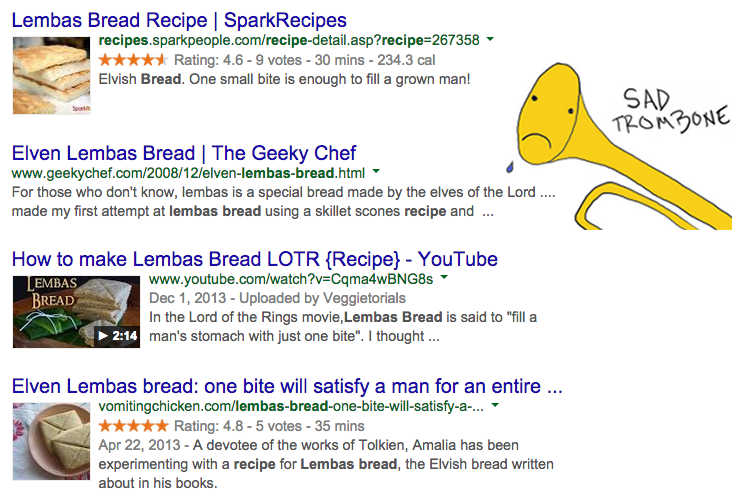
Organic snippets like these are why most SEOs are implementing semantic markup. I don't think we need to debate that. Everyone wants to get those beautiful, attractive, CTR-boosting rich snippets and, in some cases, you're at a competitive disadvantage simply by not having them.

If you're like me, you love seeing your sites earn rich snippets in Google's search results. I loved it so much that I let myself believe that this was the end goal of semantic markup: landing the rich snippet. When I implemented markup for various entities on the sites I worked on, I'd get the markup added to the site's code, verify that it was successfully crawled, watch the rich snippet show up, and then call it a victory! Hooray!

Tracking the ROI of semantic markup

Well, I've come to the realization that this simply can't be the measure of success for your semantic SEO strategy! What difference does that rich snippet really make? C'mon, be honest. Do you know what the real impact was? Can you speak to your boss or your client about how pages with a specific type of markup are performing compared to their non-marked up counterparts? Another question to ask: Are you leveraging that semantic data for as much value as you can?

Is there a way to more effectively track the ROI of semantic markup implementation while simultaneously giving us a deeper level of insight regarding how our site is performing?

The answer is yes! How? It's (relatively) easy, because we've already done the hard work. Through applying semantic markup to our site, we've embedded an incredibly rich layer of meaningful data in our code. Too often, SEOs like us forget that the idea of the semantic web extends far beyond search engines. It's easy to add schema.org entity markup to our pages and and think that it ends when search engines pick up on it. But that can't be the end of the story! Don't let the search engines have all the fun; we can use that data, too.

By looking at the semantic markup on any given page, we can see what type of "entity" we're looking at (be it an "Event," "Person," "Product," "Article," or anything else) and we can also see what attributes or properties that entity has. If we could gather that information and pump it into an analytics platform, we'd really have something great. So let's do that!

Using Google Tag Manager to record structured data

Google Tag Manager was the game changer I didn't know I needed. There are a few great posts that provide nice overviews of GTM, so I won't get too deep into that here, but the key capability of Google Tag Manager that is going to allow us to do amazing things is its inherent ability to be awesome.

Okay, let me explain.

The value of any tag management platform lies in its ability to fire off tags dynamically based off of Rules and Macros. This is incredible for anyone doing advanced analytics tracking because you can attach granular tracking elements to various sections of your site without (theoretically) ever having to touch your code. Need to track a click on an image banner in your sidebar? Just set up a Tag in Google Tag Manager that fires based on a Rule that uses a Macro to identify that image banner in the code of your site!

So what I'm ultimately trying to share with you through this post is a methodology for using GTM to bring your semantic markup in to your analytics platform so you can not just track the ROI of adding semantic markup to your site, but leverage that markup for a deeper level of insight into your data. I've taken to calling this "semantic analytics."

Tags, rules, and macros

Before we get into the nuts and bolts of how this all works, let's go over Tags, Rules, and Macros in Google Tag Manager.

  • Tags: In the context of analytics, a Tag is any piece of tracking code that is going to send information back to Google Analytics (or your analytics platform of choice). Nearly every site on the web is going to have a basic pageview tracking Tag on every page; every time you load a page, that Tag is fired and sends information about that pageview to an analytics platform (e.g. Google Analytics). But we can get even better intelligence by having additional tags send other information into Google, like "event" tags which can send information for things that happen on the site (clicks, scrolling, non-click interactions, video plays, etc.). Google Tag Manager lets you configure any Tag you want, which will fire based on a Rule.
  • Rules: A Rule in Google Tag Manager tells a Tag when to fire. Without a Rule attached to a Tag, it will never fire (i.e. send info to Google Analytics) so the most basic Rule is one that is triggered on every page. However, you could set up a thank-you page conversion event tag for AdWords, for example, that only fires on a page with a URL matching /contact-form/thank-you/.
  • Macros: Macros are by far the most powerful features in Google Tag Manager. Their power seems almost limitless, but the key thing we'll be looking at here is the ability to create a JavaScript Macro that will look in the DOM (Document Object Model) for specific elements. This allows you to look for specific elements in the HTML and fire events based on what you find.

What we'll want to do in Google Tag Manger is create a Macro that looks for semantic markup in the code of a page. We can then use a Rule to fire a Tag every time someone views a page that has semantic markup on it and include event labels that record what type of entity that person looked at. Ultimately, this will let us drill down into analytics and view reports to see how marked up pages perform against their non-marked up counterparts. We can even pull out granular properties of entities and analyze based on those (for example, pull the "performer" item property out of all "Event" entities and see which "performers" got more traffic and/or led to more conversion events).

Setting up semantic analytics

So let's walk though the whole semantic analytics process using a website that lists industry events as an example. Since I'm familiar with it, let's use SwellPath.com as our example since we list all the events we present at in our Resources section.

For each industry event on our site, we have semantic markup that specifies the Event schema.org itemtype and defines various associated itemprops, including the speaker (itemprop="performer"), venue (itemprop="eventVenue"), event name (itemprop="name"), and time (itemprop="startTime"). At the most basic level, I want to be able to track all the pages that have Event markup. If I wanted to get ambitious (which I do!), I want to pull the speaker name, event name, and venue name, too.

To do this, we'll want to set up a Macro, which is the condition for a Rule, which then fires a Tag. However, we're going to dive into that progression in reverse order. Yeah, we're going full Tarantino.

Setting up the Tag

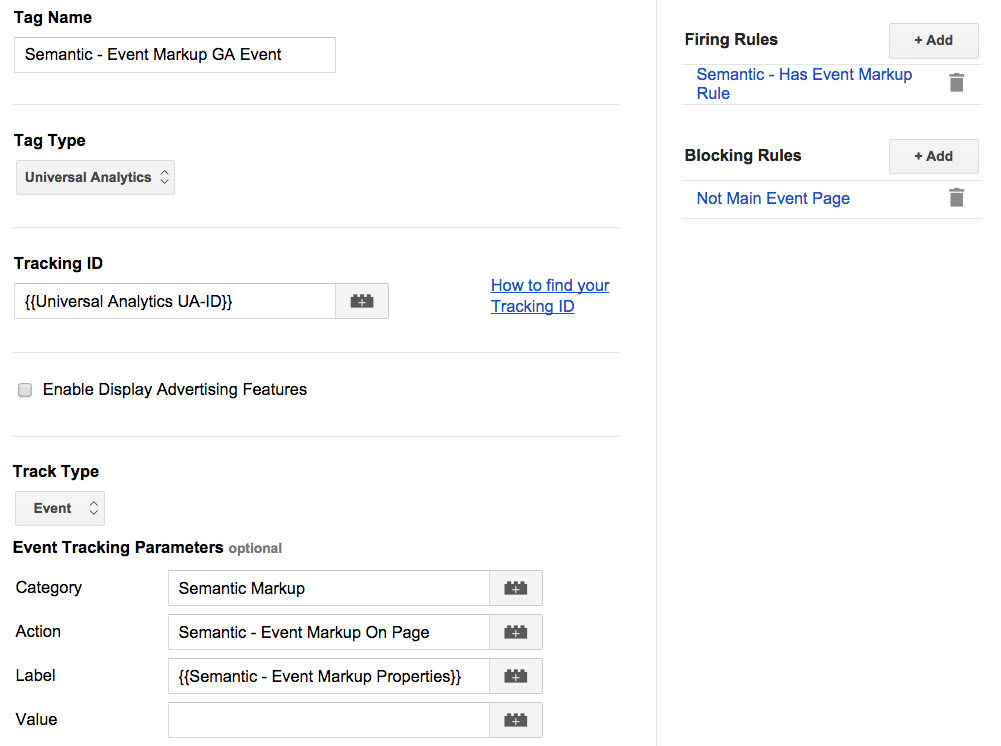
The Tag we want to set up in Google Tag Manager will look like this:

The category for all of our semantic events will be "Semantic Markup," so we can use it to group together any page with markup on it. The event action will be "Semantic - Event Markup On-Page" (even though it's not much of an "action," per se). Finally, we'll want to make the label pretty specific the individual item we're talking about, so we'll pull in the speaker's name and combine it with the even name so we have plenty of context. We'll use a Macro for that, but more on that below.

Configuring the Rule

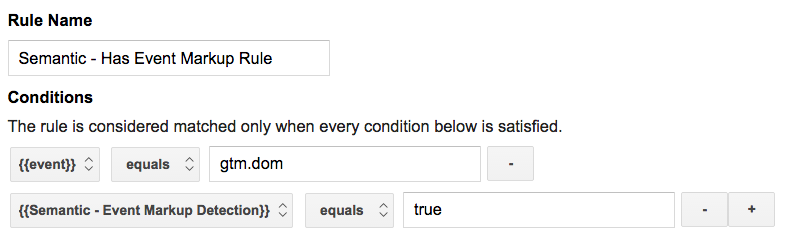
Without a Rule though, our Tag won't ever fire. We can't just set it up to fire on every page, though; we need to have a Rule that says "only fire this tag if semantic markup is on the page." Our Rule will include two conditions.

  1. The first condition looks for an event that is equal to "gtm.dom". This is an event that Google Tag Manager can pick up out-of-the-box and it means the that Document Object Model (DOM) finished loading (in simple terms, the page finished downloading). The reason we need this is because we need to tell Google Tag Manager to look in our code to find semantic markup; it doesn't make sense to do that before the page has finished loading.
  2. The second condition for our Rule is a Macro that's going to look for specific markup on the page.

Building the Macro

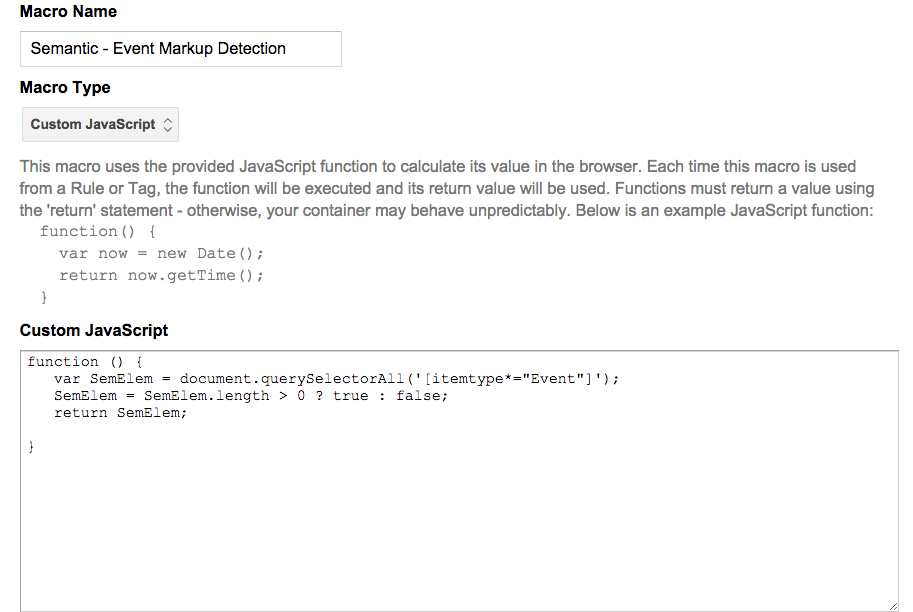
The Macro is the really cool part! To get it set up, we'll create a Macro that uses "Custom JavaScript." Inside of the Macro, we essentially want to create a function that looks for our itemtype tag from schema.org on the page and returns either "true" or "false". The screenshot that follows shows what it looks like when you set it up in Google Tag Manager, but I've provided the text of the Macro as well so you can cut and paste.

function () {
   var SemElem = document.querySelectorAll('[itemtype*="Event"]');
   SemElem = SemElem.length > 0 ? true : false;
   return SemElem;
}

Keep in mind that I'm using jQuery here to make sure it works across most browsers. Make sure that whatever site you implement this on also has jQuery installed, or this Macro won't work.

While we're here, we'll also create a Macro to pull out specific itemprops that we want to use later. Specifically, the event name and the performer name. We can then combine those two variables in our Macro function to form a sentence that we'll use as an event label later on. I also added an If statement so that it returns "No semantic data" if any important events are missing.

function () {
   var venue = $('[itemtype*="Event"] [itemprop*="name"]') [0];
   var performer = $('[itemtype*="Event"] [itemprop*="performer"]') .text();

   venue = $(venue).text();

   label = performer + " at " + venue + " (Semantic Event)";

   check = venue.length > 0 ? true : false;
   if (check === false) {
      label = "No semantic data";
      return label;
   }
   else {
      return label;
   }
}

Putting it all together

To actually set this up in Google Tag Manager, you'll set up all the elements we just discussed in reverse order (do you get my previous Tarantino joke now?). First, create your Macros in GTM. Then create your Rule using the Macro you just created as one of the criterium. Finally, create your Tag that fires based on the Rule.

From there, you can push the new version of your GTM Container Tag live. If you're smart, though, you'll run it in Debug Mode first and make sure that you have it set up correctly.

Naming Conventions

What good is a standardized vocabulary for your web data if you don't have a standardized naming convention for your Google Tag Manager and Google Analtyics set up? Here's what I use, but feel free to use what works for you:

  • Macros: Semantic - {Item Type} Markup Detection
  • Macros: Semantic - {Item Type} Markup Properties
  • Rule: Semantic - Has {Item Type} Markup Rule
  • Tag: Semantic - {Item Type} Markup Analytics Event

Making it even easier

Thanks to Google Tag Manager's amazing new API and Import/Export feature, you can speed up this whole process by importing a GTM Container Tag to your existing account. That way, you don't have to set up any of the above; you can just import it.

All you have to do is download this JSON file called " Semantic Analytics Headstart" (DropBox link) and then use the Import option in your Google Tag Manager account.

Within GTM, just select the Semantic Analytics Headstart JSON file you saved as your file to import, select Merge, and choose Overwrite. The only thing that this Container Tag has in it is the Semantic Macros, Rules, and Tags, so Merge and Overwrite will simply add these special features to your existing configuration. Just note that the Semantic Tags reference a Macro that contains your Universal Analytics tracking ID (i.e., make sure to edit the Macro called "Universal Anatlyics UA-ID" and put in your own tracking).

Semantic data in Google Analytics

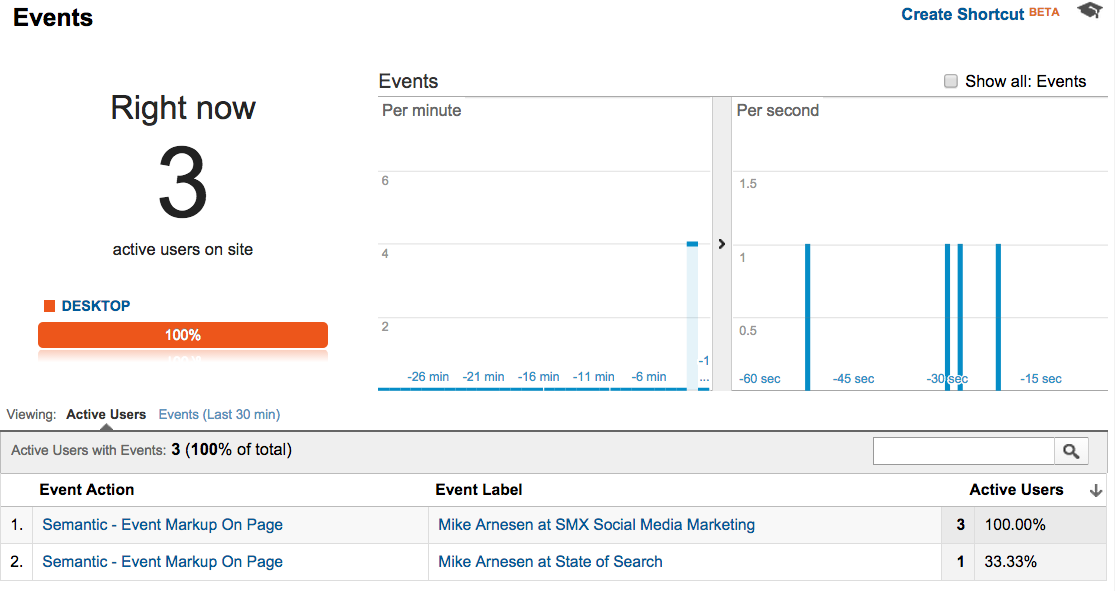
Congratulations! You now have all the pieces in place to start receiving semantic data in Google Analytics. Go ahead, go check your Real Time Events report. I'll hang here.

Okay, seriously, how cool was that?

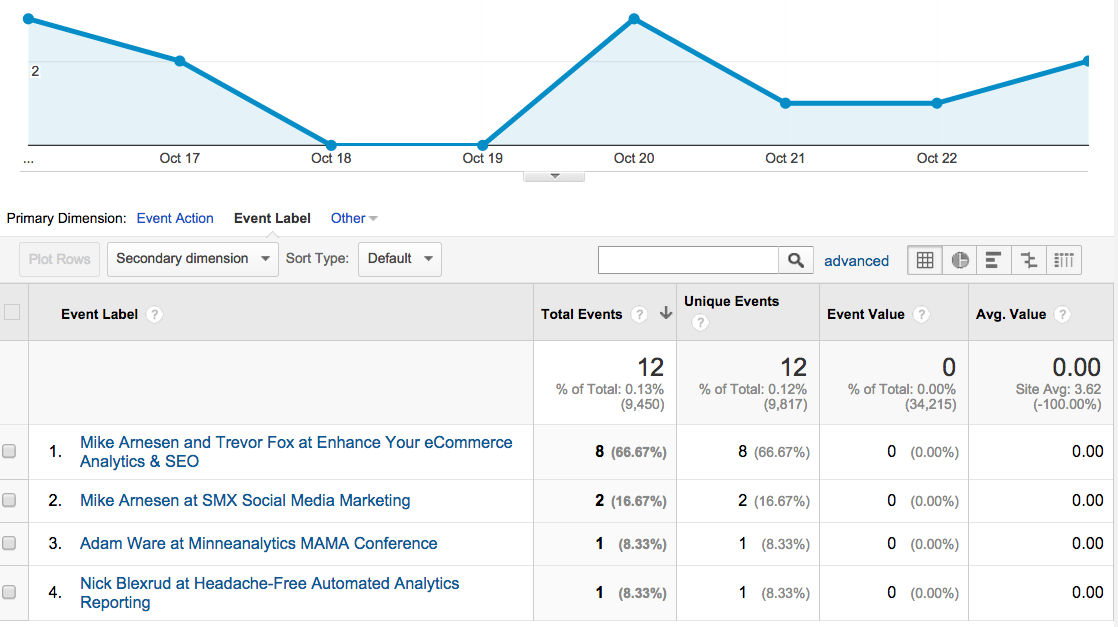
There's something incredibly special about giving your data meaning. Whether you get that by having an intimate relationship with your data platform, having super-advanced tagging in place, or making your analytics truly semantic by applying the principles of the semantic web to your data collection, you're doing something amazing. Now that you have semantic data in your analytics, you can drill down into specific categories and get some really cool information.

Another path

I feel like passing in semantic data as Events in Google Analytics is fairly straightforward, and the step-by-step process makes it fairly easy to grasp, but there's another (perhaps even better) way to add semantic data to your analytics. In analytics speak, a "dimension" is a descriptive attribute of a data object. Sounds pretty similar to itemprops on the semantic web, eh? So, why not set up Custom Dimensions in Google Analytics and use those to enhance our semantic analytics? Let's do it!

Fortunately, we've already put a lot of the pieces in place to access our semantic data, so we just have to create the Custom Dimension in Google Analytics and shoot data to it by adding a field in GTM. First, go to the Admin panel in you Google Analytics account and go to "Custom Definitions" > "Custom Dimensions". From there you'll want to create a new Custom Dimension called "Semantic Markup" with the "Scope" of "Hit" and set it to be active.

Make a mental note of what the index is; you'll need to specify it in Google Tag Manager. With the Semantic Event tag that we set up in GTM, we created an entirely new tag that would fire something on pages with semantic markup. For Custom Dimensions, we'll want to add something to our general analytics.js tag (the basic pageview tracking for Google Analytics). Once you find your main analytics tracking code in the list of tags, open it up and scross down to Custom Dimensions (under More Settings). Click the button to "Add Custom Dimension" and use the same index that you made a note of and, for the Dimension field, we'll use the same Macro we used for our Event label: Semantic - Event Markup Propertites.

Once you have this set up, you'll be able to bring in a "Semantic Markup" dimension to almost any Google Analytics report. Here's an example All Pages report that now displays Semantic Markup in addition to the Page URL.

I introduced this Custom Dimension approach as "another path," but really, I like to use it as a supplement and work both angles. Having both semantic events and semantic dimensions set up in Google Tag Manager won't cause any issues; it will just give you more meaningful data. Who doesn't love that?

Looking forward with semantic analytics

What can you accomplish by a applying semantic values to your data? That's what I'm most excited to find out.

I'm working on getting this up and running on sites that publish tons of content (Article markup), process thousands of eCommerce transactions (Product markup), and have lists of experts (Person markup). I'd love to see what semantic analytics could do for local business directories (Yelp), movie sites (IMDB), car dealerships, and recipe sites (my buddy Sam Edwards is already looking to implement this idea for Duncan Hines).

One of the biggest "mind blown moments" of my career was when I discovered that there was a whole semantic web community out there that wasn't just concerned with marking up content to get better looking snippets in the SERPs; they wanted to use semantic markup to make data more accessible and meaningful and to make the web a better place to be. I'm hoping that amazing folks like Aaron Bradley and Jarno van Driel will be able to help evolve this concept and inspire widespread adoption of semantic analytics.

If you have any questions, ideas for how this could be applied, or ways to extend this concept, let me know in the comments! Happy optimizing.


Sign up for The Moz Top 10, a semimonthly mailer updating you on the top ten hottest pieces of SEO news, tips, and rad links uncovered by the Moz team. Think of it as your exclusive digest of stuff you don't have time to hunt down but want to read!

By |October 28th, 2014|MOZ|0 Comments

Microsoft Office 365 Now Offers Unlimited Cloud Storage

Microsoft-office-365
Feed-fb

Microsoft's cloud-based Office platform just got a big upgrade: The company announced on Monday that Office 365 subscribers will soon have unlimited storage on OneDrive at no additional cost.

OneDrive works much like Google Drive, allowing you to access content on all of your devices, plus share it and collaborate on documents. Unlike traditional Microsoft Office, the platform updates automatically. Google Drive, Box, Dropbox and other cloud-storage utilities, though, have limited storage capabilities. If you meet a limit, you have to buy more...

More about Microsoft, Cloud, Office 365, Tech, and Apps Software

By |October 27th, 2014|Apps and Software|0 Comments